A data lake is a framework, concept, and guidance on where to place data (Microsoft named their product Azure Data Lake, but the concept is broader). From a technology point of view, it suggests storing all data in object-oriented or hierarchical storage. This is the concept of data locality — data can be collected in a central location and processed at that location before being disseminated to any consumers.
Microsoft, AWS, and Google (GCP) all have great offerings in this area: Azure Storage Accounts, Amazon S3, and Google Cloud Storage respectively.
The first question teams face when implementing a data lake is: “How do I structure it?” There is no database or table concept here — we are dealing with folders and files, so the structure of the data lake becomes an important factor before starting implementation.
There are no right or wrong approaches; it comes down to the structure of the organization, business priorities, and outcomes needed. There are, however, recommendations and best practices that can be leveraged to design a lake that can be maintained and managed.
Key Reasons for a Good Data Lake Structure
- Security — Need for role-based security on the lake for read access
- Extendibility — It should be easy to extend the lake after the first round as more systems are added
- Usability — It should be easy to use and find data in the lake; users should not get lost
- Governance — It should be simple to apply governance practices in terms of quality, metadata management, and ILM
Recommended Structure
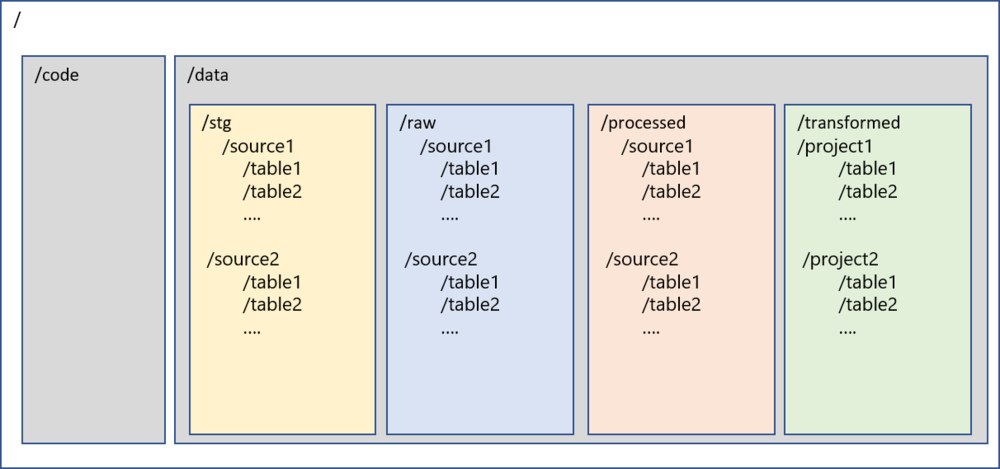
/
├── code/                  # All code-related files, JARs, libraries
└── data/
    ├── stg/               # Staging: transient layer, purged before next load
    ├── raw/               # Raw: complete snapshot from ingestion, by source system
    ├── processed/         # Processed: certified data after quality rules applied
    └── transformed/       # Transformed: business-specific transformations by project
Folder Descriptions
/code — Primary level-1 folder to store all code-related files. Sub-folders can be created for various types of code, JAR files, libraries, etc.
/data — Primary level-1 folder to store all data in the lake. Code and data are the only two folders at the root level.
/data/stg — Staging layer. Stores intermediate data from ingestion mechanisms. This is a transient layer that is purged before the next load, providing resiliency to the lake.
/data/raw — Raw layer. Stores a complete snapshot of records captured during ingestion. This folder is further segregated by source systems and tables. Under each source and table folder, files are organized by the time the data was loaded. IoT or streaming data can also be accommodated here.
/data/processed — Processed layer. Stores data that has been processed and certified from the raw layer. Data quality rules, inserts/updates/deletes can be applied to /raw and data moved here. Also commonly named /certified, /curated, or /consumption.
/data/transformed — Transformed layer. Stores data after business-specific transformations have been applied. Sub-folders vary by project and initiative. Also commonly named /downstream, /final, or /project.
Benefits of This Structure
- Data lineage and data mapping is easier, enabling data traceability
- Enables reuse of source data assets for other projects
- Project-specific transformations are carried out in the data lake using the latest technologies at scale
- Security can be easily applied at each layer to enable RBAC